YES UNTIL NOPE
YES UNTIL NOPE
- I assume every open date is a yes. If it's not, mark it off. Quick and easy, no explanations needed.
- If someone's already marked an off, add yours too. I'm tracking people, not reading minds.
- If nobody's marked it off, that date's fair game for booking without a heads-up.
STAY CURRENT
STAY CURRENT
- If your plans change, clear your off. Please.
- I don't send alerts when someone frees up a date, so keep your own offs up to date. No mind reading, no Bat Signals.
SHOW UP OR STEP UP
SHOW UP OR STEP UP
- The plan's simple: play the shows you're booked for. If something comes up more than 30 days out, I'll work with you to find a sub.
- Inside 30 days, it's on you to find your own replacement or play the gig. I'll help you try to find someone, but the hustle's yours.
IN THE CRUNCH
IN THE CRUNCH
- Anything that pops up inside 7 days needs a thumbs up from everyone before I say yes.
- If an emergency hits, we'll deal with it. It won't be our first rodeo.
MAKE IT STICK
MAKE IT STICK
- The calendar lives in BandHelper, and I assume yes unless you mark it off.
- Only mark offs for Fridays, Saturdays, and the occasional big weekday (like Thanksgiving Eve).
- Everything's on the calendar at /dates.
- Mark your offs yourself, even if someone else already has.
ADD YOUR OFF
ADD YOUR OFF (BandHelper web)
- Go to BandHelper.com
- Click Log In.
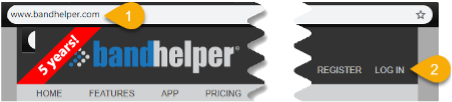 Steps 1-2: BandHelper home and Log In.
- Account name: timtrace
- Username: your username
- Password: your password
- Click Log In.
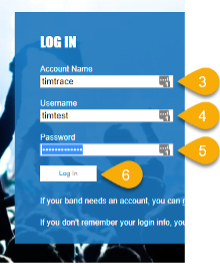 Steps 3-6: Enter credentials and log in.
- Click Schedule in the top menu.
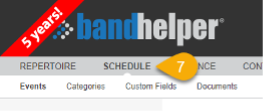 Step 7: Open Schedule.
- Click Add an Event.
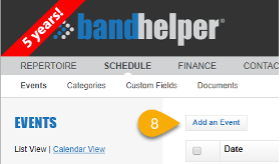 Step 8: Add an Event.
- Name: enter
Off-YourName (e.g., Off-JimC). Be consistent.
- Category: select Off.
- Start Date: pick the date you need off.
For multiple days, make a separate Off event for each.
Don't use multi-day events.
- Notes: optional. Add a quick word if you want a reminder later (e.g., Nerds, Wedding, Vacation).
- Users: click All.
On your phone, you'll need to scroll down to find the Users section.
- Click Save.
- Check that your event shows up in the web app.
It may take a few hours to sync to your phone and the band calendar.
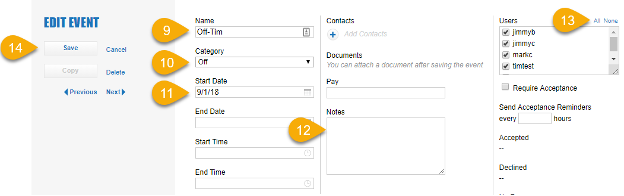 Steps 9-15: Fill in the event and save.